ILS capture sequence
In this example, LOC and GS are captured. Check your own PFD and FMA during each stage of the approach.
Chart data
Frequency, course and altitudes.
Horizontal cue: localizer
Vertical cue: glideslope
Write down the runway, localizer frequency, front course, intercept altitude and missed-approach altitude.
Check tuning
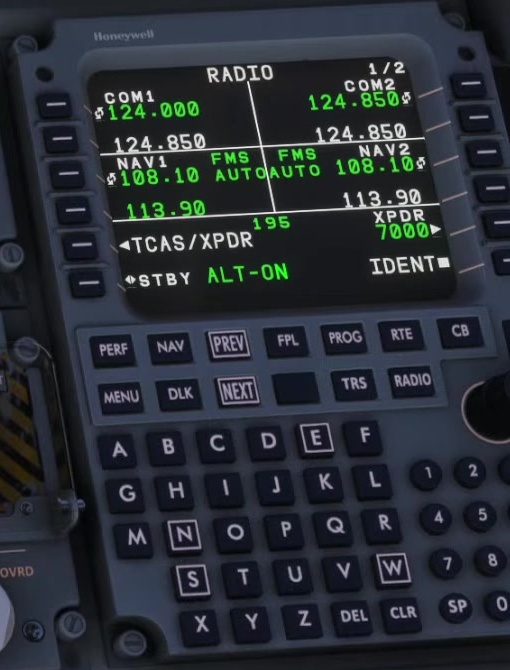
Read the tuned receiver and course. Compare both with the chart. Manually changing either one disconnects FSS Auto Tune.
Check the source
Read the PFD source label. With FMS selected, check that the appropriate LOC1 or LOC2 preview is displayed before using APP.
Set the intercept
Fly the cleared heading and altitude. Check speed and aircraft configuration.
Arm APP
Press APP as described for the setup. FSS says APP has no effect in FMS source without NAV1/2 preview. Look at the FMA for the armed indications.
LOC capture
As the deviation moves toward centre, check for LOC capture. Confirm the aircraft starts tracking the intended path.
GS capture
Check the glideslope deviation and the vertical FMA. Confirm GS becomes active; an armed indication alone is not capture.
Set missed altitude
After GS capture, set the missed-approach altitude as described by FSS. Continue to monitor speed, path and configuration.
Unstable approach
If unstable, fly the missed approach.
If the guidance is unreliable or the aircraft is not stable, discontinue the approach and fly the missed approach. [9]