STEEP mode on the E190 and E195
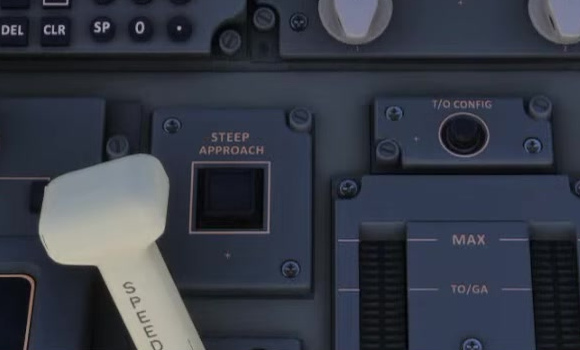
FSS documents STEEP for the E190 and E195. When active, the mode uses spoilers 4 and 5 to add drag. FSS says pulling the yoke reduces their deployment; pushing it increases deployment.
Verify the aircraft and procedure
Choose a suitable aircraft and a published steep approach. Brief the approach angle, configuration, minima and missed approach.
Set landing data
FSS says the steep approach uses FULL flaps and warns that the MCDU landing preference may initially show FLAPS 5. Verify the landing page.
Arm STEEP
Approaching the glideslope, press the STEEP button on the left side of the pedestal. Confirm white STEEP on the FMA. Press the button again to disarm.
Complete configuration
Select gear down and FULL flaps within the aircraft limits. Both are required for STEEP to engage. FSS recommends FULL shortly before glideslope intercept to avoid a long level segment with spoilers extended and high thrust.
Confirm activation
Confirm green STEEP and monitor the aircraft.
Check that STEEP turns green on the FMA. FSS says it flashes momentarily when the mode engages. Monitor speed, thrust, path and configuration.
Monitor the transition
Losing conditions can deactivate the mode.
FSS cautions that losing the engagement conditions deactivates the mode. Check the FMA and aircraft response if the configuration changes.
Plan the landing
Practise the documented landing technique.
FSS recommends an earlier, powered initial flare and warns of tailstrike risk. Practise in the simulator with suitable conditions and go around if unstable. [164]