FMS vertical guidance during descent
The FMS path is a prediction. The selected altitude, active mode and actual aircraft energy determine what the aircraft does with that prediction.
Check the profile
Confirm PERF INIT and inspect the predicted top of descent and the first meaningful altitude restriction. Set the lights and seat-belt signs for descent.
Set the cleared altitude
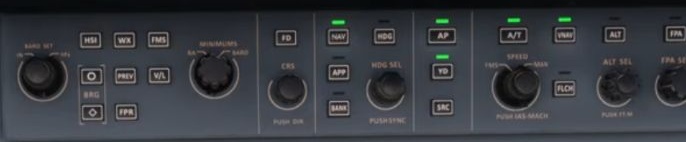
When authorised in the simulation, select the next cleared altitude. Verify the digits in ALTSEL.
Watch for path capture
With the correct navigation source and VNAV setup, monitor whether PTH is armed and then active. Check the FMA and vertical deviation.
Manage speed
Observe the selected target, actual speed and thrust. Anticipate deceleration and configuration changes. Review the landing data and set the autobrake for the planned landing.
Recheck the altimeter
At the applicable transition level, set and cross-check the appropriate local pressure using the chart and local rules.
Handle a change
If a new clearance or route edit makes the path unsuitable, stabilise the aircraft, select a suitable mode and review the new active route and constraints. [38]