FLCH speed target
In FLCH, the aircraft uses pitch to seek the target speed. Thrust affects the resulting climb or descent. Check the FMA, speed target and selected altitude, then watch the aircraft response.
Current speed and altitude
Check current speed, height, pitch, thrust, selected altitude and the flight-director command.
Select deliberately
Use the mode appropriate to the cleared task and the installed version. Avoid selecting a high speed target at low height without understanding the resulting pitch demand.
Verify the FMA
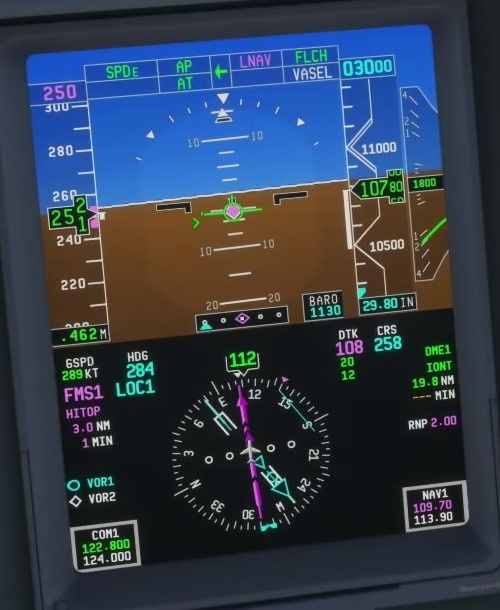
Check whether the aircraft has entered selected FLCH or FMS FLCH, then compare the speed target with the plan.
Monitor thrust and path
Watch speed trend, vertical speed and altitude. If the response is unsuitable, take control and recover a stable situation.
Unexpected trim input
If trim behaves unexpectedly, check simulator assistance, calibration and duplicate control assignments.
FSS describes green FLCH as a selected mode and magenta FLCH as an FMS mode. In magenta FLCH, the target can come from the FMS speed schedule or from the speed selector when set to MAN. Check both the mode and the speed source.
MAN speed means you select the speed target. It does not by itself mean that autothrottle is disconnected: check the A/T indication and the active thrust mode separately. FSS speed control [50] · FSS autothrottle modes [51]. [38]