Start and monitor each engine
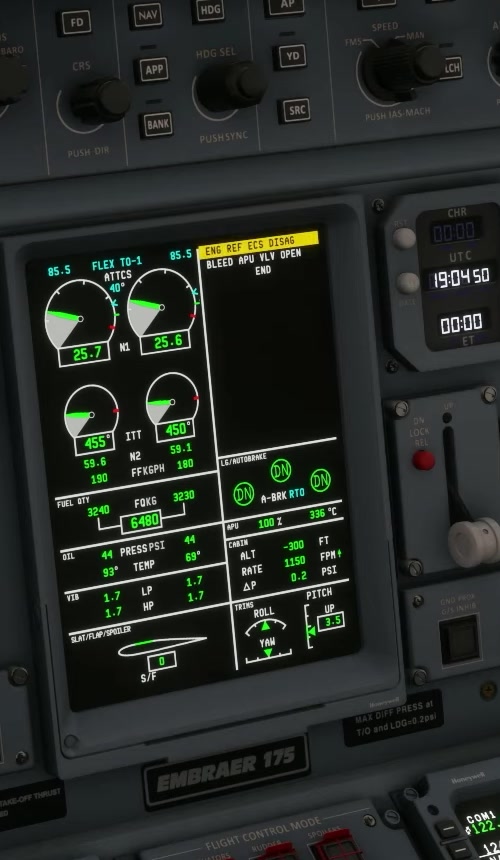
Verify the supplies
Check electrical power, pneumatic source and the relevant engine controls. Confirm ignition is not inadvertently OFF.
Select the engine
Use the FSS start procedure and select START on the intended start/stop control. The START position is momentary.
Monitor the start
Watch N2, the applicable fuel indications, temperature, oil pressure and EICAS. The FSS checklist calls for ignition A/B at 7% N2, a fuel-flow indication at 20% N2, and ignition A/B out at 50% N2; it does not identify which display shows the 20% cue. These are observations during a normal start, not prompts to introduce fuel manually. In Service Update 1 (version 1.1.0), an engine starting above 120°C ITT first dry-motors without fuel until it cools below that threshold; the normal ignition sequence follows. During that phase, fuel introduction is delayed. If the sequence does not continue after the temperature falls, or the indications remain abnormal, stop and use the applicable FSS guidance. FSS Service Update 1 [2]. Check the current checklist for its oil-pressure timing and the response to an abnormal start.
Confirm stable operation
Check that the engine reaches a stable idle with no unexplained warning. Repeat for the other engine according to the applicable procedure.
Check electrical transfer
Use ELEC to check sources and the supplied buses
No values are prescribed here.
Use ELEC to see the engine-driven source and buses. FSS recommends waiting 30 seconds after N2 stabilises before switching off the APU or disconnecting the GPU. Alternatively, follow the transfer on the electrical synoptic. The real-aircraft SOPM gives the same recommendation [L01, PDF p. 165].
Reconfigure after start
Set hydraulic pump 3A, flaps, lights and other controls as described in the current FSS after-start flow. Check actual indications. [9] [116]