Settings for troubleshooting
Record the aircraft
Note the variant, simulator and exact add-on version.
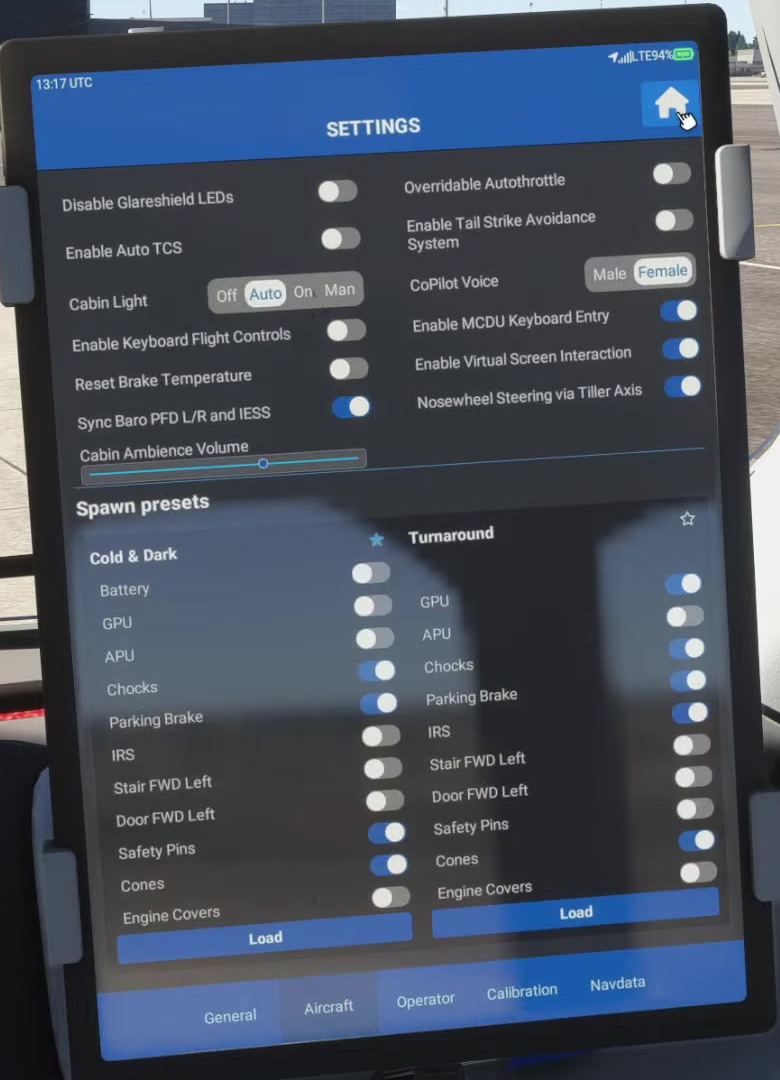
Check the Aircraft tab
Review Auto TCS, Overridable Autothrottle, startup procedures and tiller steering. On E190/E195 and freighters, note the optional TSA switch. The example image shows TSA OFF; record its state before comparing pitch or flare response.
Check the Operator tab
Many operator settings are stored per livery. Check the options for the livery you loaded.
Check simulator assistance
Check automatic trim and assistance.
Review auto-trim or other control assistance before diagnosing a flight-control problem.
Check hardware
Inspect duplicates and continuous inputs.
Look for duplicate bindings or an axis that keeps sending an input.
Repeat one change at a time
Record the initial settings, change one item, and repeat the same flight phase. Compare the FMA and aircraft response.
On E190/E195 aircraft and their freighters, FSS documents an optional Tail Strike Avoidance System (TSA). The EFB switch is off by default. FSS introduced the feature in version 0.9.33; its current settings page still describes it. Check the switch in your installed build before comparing pitch or flare behaviour. FSS EFB settings [91] · FSS version 0.9.33 [172].
With TSA enabled, the current FSS settings page describes nose-up elevator limiting near the ground: on takeoff below about 28 ft radio altitude with thrust above about 70%, and on landing below about 78 ft with landing flaps. At or below about 12 ft, a pitch more nose-up than roughly −5° commands a nose-down elevator bias. The older 0.9.33 release note instead gives a general “up to 20 ft” description and does not explain how that relates to the current triggers. Use the detailed settings page as the reference, but treat these values as build-dependent. They are not real-aircraft limits or a reason to pull harder. FSS warns that a full aft-yoke input can still produce a tail strike. Version 0.9.33 description [172] · Current Settings page [91].
With Overridable Autothrottle enabled, FSS says lever input can override A/T without disconnecting it. The general disconnect instructions do not state clearly whether they apply only when this option is off. They also differ at exactly 60 kt: one says “below 60,” the other “above 60.” Check the setting and FMA in your installed build. EFB settings [91] · Procedure Guide [9] · Thrust Lever Quadrant [51].