Anti-ice ground and flight conditions
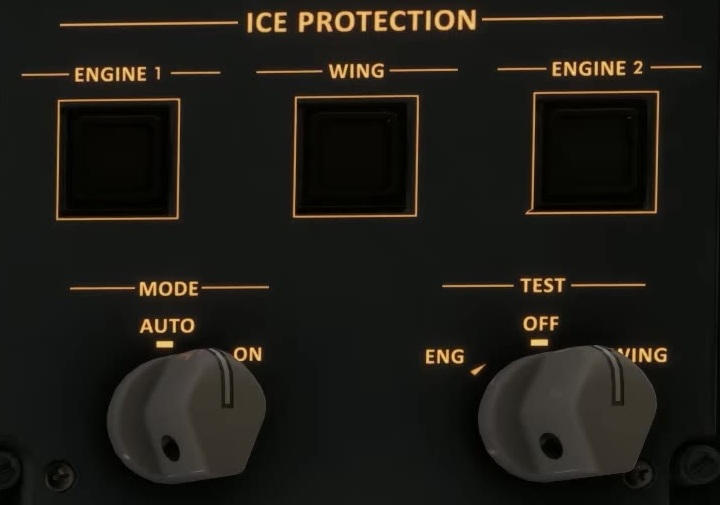
Icing conditions
Review outside temperature, moisture and contamination. For ground operations, FSS lists engine anti-ice at 5–10 °C OAT and all anti-ice below 5 °C OAT when visible moisture is possible up to 1,700 ft above field elevation, or snow, ice, standing water or slush may be ingested or freeze on engines, nacelles or sensors. Check the full FSS limitations before departure.
Check the overhead
Identify engine, wing and windshield controls and the ice-protection mode selector. Check that selections match the intended phase and conditions.
Ground operation
Compare the actual anti-ice configuration with REF A/I in the takeoff dataset. FSS describes MCDU-controlled ground operation in red text, but the current Welcome page does not explain the highlighting. Confirm the behaviour in your installed build before relying on it. Treat the MCDU-controlled ground function as unconfirmed and use the selectors and indications shown in your aircraft.
In-flight operation
With the relevant protection buttons pushed in, FSS describes AUTO opening the anti-ice valves when ice is detected. It says they remain active for two minutes after detection ends. Check the synoptic and CAS.
Approach operation
For taxi-in, FSS says to select the mode knob ON if icing is anticipated or encountered. With the relevant protection selected, FSS describes engine anti-ice operating on the ground when an engine is running, and wing anti-ice above 40 kt wheel speed. Check the actual indications.
Failed ice detector
In flight, if either ice detector has failed and icing exists or is expected in visible moisture below 10°C TAT, the FSS limitations call for selecting the ice-protection mode to ON. Check the system indications and use the applicable abnormal procedure.
With the WING ice-protection button pushed in, FSS describes the crossbleed valve opening automatically if one engine or bleed-air source fails, allowing the other bleed source to supply both wings. Check the actual valve and system indications. FSS ice protection [113].
On a contaminated taxiway, the supplied Petro Air E170 procedure calls for low taxi speed and reduced breakaway thrust [L02, PDF p. 103]. Treat this as an operator example; check the FSS procedure and the conditions in your simulator. [113] [10]