Cruise altitude selection
FSS expanded step-climb logic in version 1.1.0. The FMS can plan a higher cruise level from a waypoint; the selected altitude and clearance still matter.
Choose the waypoint
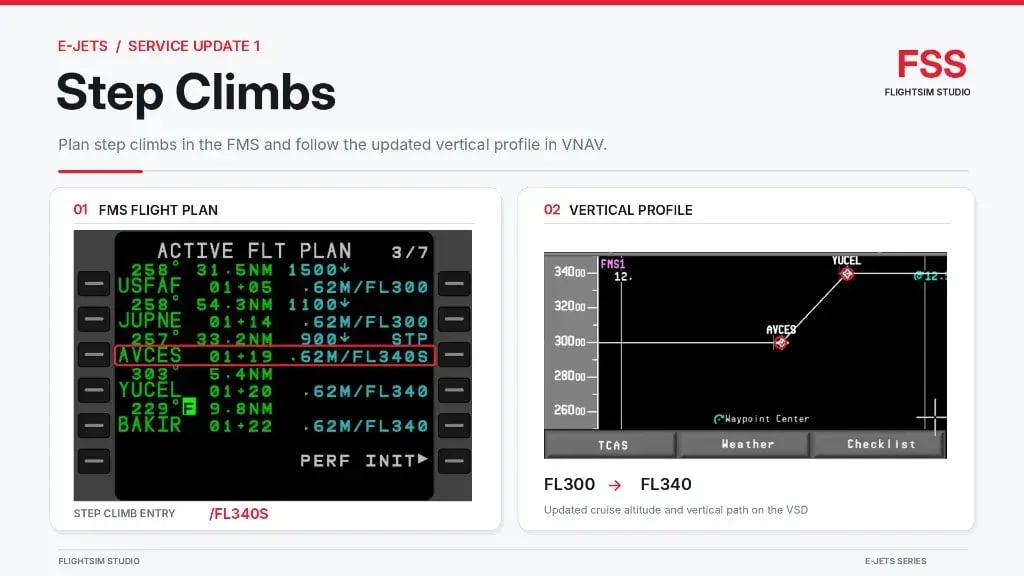
FSS 1.1.0 example: the planned step uses AVCES as its waypoint. Check the chosen waypoint against your route and clearance; the illustration shows the completed entry, not how the waypoint is selected. FSS Service Update 1 [2]; full official illustration, unaltered.
Identify the waypoint at which the climb is planned and check it against the route and clearance.
Choose the flight level
FSS 1.1.0 example: /FL340S is the format shown for a planned step to FL340. Use the level cleared for your flight. The illustration shows the completed example, not the selection action. FSS Service Update 1 [2]; full official illustration, unaltered.
Confirm that the requested cruise level is appropriate for the aircraft and flight. For a planned step to FL340, use /FL340S.
Enter the step
FSS 1.1.0 example: AVCES and /FL340S appear together on the flight-plan line. This is the resulting entry, not the key presses. FSS Service Update 1 [2]; full official illustration, unaltered.
At the selected waypoint, enter /FL340S for a step to FL340. Replace 340 with the intended three-digit flight level.
Check the entry
FSS 1.1.0 example: AVCES carries /FL340S in the flight plan. Check the waypoint and cleared level against your route. The adjacent vertical profile is a prediction, not an active climb; the graphic does not show the key presses or an UNABLE STEP CLIMB result. FSS Service Update 1 [2]; full official graphic, unaltered.
Review the waypoint and target level. If the FMS displays UNABLE STEP CLIMB, FSS says the predicted weight at that waypoint is too high for the requested level; revise the plan.
Review the profile
FSS 1.1.0 example: the planned vertical profile rises from FL300 to FL340 at the selected waypoint. This is a prediction, not an active climb. FSS Service Update 1 [2]; full official illustration, unaltered.
Check the vertical situation display. FSS says the planned cruise altitude is recalculated from the selected waypoint and the altitude change is displayed.
Set the clearance
When the climb is authorised, set the cleared altitude on the glareshield in advance. Do not select an uncleared altitude merely because it is in the plan.
Monitor the climb
With VNAV engaged, check the active mode, altitude target and aircraft response as the step begins and approaches the new level.
The FSS roadmap and the newer Service Update 1 announcement differ: the roadmap lists step climbs as in progress, while the update describes the expanded implementation in version 1.1.0. FSS roadmap [71] · FSS Service Update 1 [2].