FMA mode annunciations
The flight mode annunciator (FMA) shows the active thrust, lateral and vertical modes, and any modes waiting to capture. Read it after each mode change. FMA discussion [46].
Read left to right
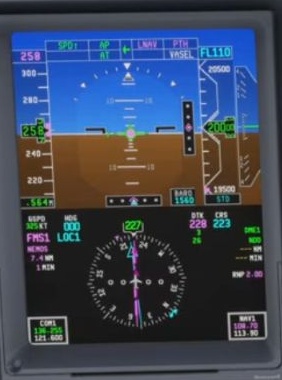
Identify thrust mode, lateral mode and vertical mode. Then check the autopilot and flight-director status and the selected targets.
Separate active from armed
An armed mode is waiting for its capture conditions; it is not yet providing the captured guidance. Watch the FMA for the actual change.
Connect colour to source
FSS describes magenta vertical indications as FMS modes, and green FLCH as selected guidance. Do not infer the entire system state from colour alone.
Unexpected mode change
Write down the FMA, navigation source, selected altitude and speed, A/T state, thrust-lever position and aircraft response before changing modes. This preserves the evidence needed to understand the event.